Showing posts with label google analytics. Show all posts

Wednesday, October 12, 2016

Why does Google Analytics show cities not postcodes?

As you may have seen in Google Analytics, it is possible to identify your digital visitors down to the city level. This is cleverly done by Google taking multiple data sources and then "guessing" where visitors are coming from.

Firstly there is something called reverse IP address lookup. This is when your Internet Service Provider gives information away about where you are connecting from. Then there's other big hints online users give away about their location, such as using a Chrome Browser on a mobile device or use Google Maps to look at their local vicinity. Each gives Google major indications as to where users actually are.

But this "guessing" does not go down to postcode level in Google Analytics.

My view is that some postcode area (e.g. PA = Paisley) are so broad they cover hundreds & hundreds of square miles and even postcode districts cover large amounts of land & people (e.g. PA1).

However postcodes themselves change over time can be so detailed as to cover as little as one house.... which would identify a person or household, which is against Google's data policy.

Friday, January 29, 2016

Will One Line Of Code Help Your SEO?

There's been quite a lot of discussion online (and a little offline) about a recent blog article called: How I Sped Up My Site 68.35% With One Line of Code

I think the biggest buzz about this article has been in the SEO community, who suddenly got all excited about a magical way to speed up web pages. Mentioned by Moz (the organic optimisation industry's catnip) you could be fooled into thinking that one person had suddenly found a way to massively boost a site to the top of the results pages.
Note: For those who don't know, the speed a page downloads is cited as one of the numerous factors taken into consideration when search engines such as Google rank (judge) your site... having a much faster page load speed with just one little line of code would be fabulous.
But alas, that's not the case.

You see, I think this article is misleading as it explains how to use an HTML tag called "rel-prerender".

For those who don't know, the rel-prerender tag is used on a website to place into computer memory the next page the site developer expects the users to click on. For example, Google sometimes use it in their search engine results pages (SERPs) to make the experience of clicking on the first result much quicker.

To explain how this works on your own website, let's imagine you are on page 1 and want to automatically call-up page 2 behind the scenes (so that it appears very quickly). You therefore insert the "rel-prerender" tag in page 1 to call up page 2 before it is clicked on.

Where might you use this?
Well you might us it on a login-page (page 1) where the logged-in page (page 2) is usually the next step. You can even use it in an eCommerce site to pre-render the shopping cart I guess.... BTW: DO NOT DO THIS!

But as you would expect, there's a catch. Pre-rendering page 2 is the act of requesting a view of it in advance. So people arriving on page 1 can trigger a page 2 view without ever seeing it and in many cases they won't. This means that in some analytic packages this is recorded as a page impression (not in GA, it's clever like that) and ads on that page may be triggered even when nobody's there to see them. Plus it also adds load onto your servers whenever a page is requested, so don't tell your tech support person you're adding further load onto the system that may never be used.

So does it have an effect on SEO? Well I may be wrong.... but I really can't see how it helps organic site optimisation as you are not speeding up the render of the page you want to appear in the SERPs (Page 1). What you are actually doing is speeding up the potential delivery of the next page (page 2) you expect the user to see.  And that's not SEO, that's a caching strategy.

Wednesday, November 19, 2014

What does Direct Traffic actually mean?

Website Analytics (e.g. Google Analytics) provide a lot of insight into digital user behaviour, including what keywords they are typing into search engines, what pages they are arriving on and the locations they are coming from.

However all too often I have seen visitors coming into a site as Direct Traffic pretty much ignored or understated as a source. For example if all other digital marketing sources come to 80% and analytics says Direct is 30%, I've heard clients say “Oh, let’s just make Direct 20% and show how good my paid for efforts are"… rather than looking at why a site is showing 110% inbound traffic.

But I think we all need to stop and reconsider this approach, take another look at direct sources of visitors and assess the value that they bring.

Although we tend to take this as "the visitors who type the URL direct into the browser" - this is not the full picture. It is also includes:
- bookmarked visits
- those campaigns that are incorrectly tagged
- those visits where the referrer data is not available (e.g. those coming from an https source, such as a secure site - which may even be your own site itself )

Note: There is even the suggestion on some forums that Google Images has been a source of direct traffic because it creates visits from links that are not traceable.


Tuesday, January 7, 2014

Why do I see 'Not Provided' in my SEO agency report?

Since October 2011 Google has increasingly been hiding the actual terms used in organic searches. This has been done by Google as they “believe that protecting these personalized search results is important”.
However, Google has only hidden these terms for organic searches and is seemingly prepared to overlook this privacy issue for its paid-for marketing service AdWords (or as search engine specialist Danny Sullivan put it more bluntly, Google Has Put A Price on Privacy )
These hidden search terms are now reported in Google Analytics under a generic “Not Provided” category and the comparative size of this catch-all segment has been steadily increasing over time. In fact, aggregated industry figures now put this figure as high as around 80% for some sites, with a major increase seen in the 3rd quarter of 2013.
http://www.notprovidedcount.com/


Whilst there are some work-arounds to try to get some insight from this missing data, site owners have no real option but to ‘like it or lump it”, use the data they still have available for search engine optimisation and hope the figure doesn't get any higher in the future.

Thursday, November 7, 2013

Stand up for Google Analytics

I’ve recently been giving a series of presentations with ScotlandIS to the Tourism and Food & Drink sectors. This has been as part of a wider series to improve the overall level of Internet Retailing skills and experience across Scotland, with my particular topic on the opportunities for eCommerce.
During this 25 minute set I take a break from providing statistics, advice and examples, to do something a little more interactive.
In one slide I build the following set of bullet points:

  • Stand up please
  • Stay standing if you currently have an eCommerce site
  • Stay standing if you are using web analytics
  • Stay standing if you use it to get regular KPI’s (visits)
  • Stay standing if you have ‘goals’ set up on your site
  • Stay standing if you are measuring eCommerce values for these 'goals'

Although quite a few people initially stand, it is surprising to see nearly every person sit down as each point appears. And in all three cases where I've given this presentation so far… only one company or site is left standing.

Although this exercise is there to provide a break from ‘death by PowerPoint’ and to show the simple path to analytics maturity, it has been a bit of a revelation to myself and the other eCommerce consultants in the room to see just how many people are not using even some of the more simple digital analytics functions.

What’s more shocking is my final point.
All of this is free!

Yes, with Google Analytics, all the points I have highlighted are freely available to any internet retailing site. Or as I more succinctly put it… “GA should be the eCommerce practitioner’s best friend”.

Hopefully I have not only communicated how simple and cost effective this tool it, I have also helped some Food & Drink and Travel & Tourism businesses.

Thursday, October 31, 2013

Know the fundamentals of Google Analytics

I've heard a range of excuses for digital types not to get to grips with Google Analytics.  From "I don't have enough time to take the course" through to "oh, it changes so often, I can't keep up" and "it costs money to take the test"... there is always a bunch of reasons not to do something

However until the end of 31st October (tonight) you have the chance to study all about GA and take Google's Digital Analytics Fundamentals exam for free:
https://analyticsacademy.withgoogle.com/preview

I took my test the other night, without reading the course material, and got 80% - a pass!


Friday, September 27, 2013

The signs that Google is killing the SEO industry

It's funny that the Internet search engine that really defined the work of search engine optimisation practitioners over the last decade is now giving several signs that it wants to kill that industry off.

1. The removal of organic results from the top of the SERPs (Search Engine Results Pages)
In a post a year ago, I commented on how little of the organic search engine results showed on the page of a normal user's screen for hotel-related searches. Back then I explained how very little actually appears above the 'page fold' on a decent size monitor and asked Google the question:
Are you trying to do away with the search engine optimisation industry entirely?
Well a year later the search giant has answered my question, by showing no organic results above the fold for certain search queries. E.g. "diabetes symptoms".


And with yesterday's announcement of 'Hummingbird' (the search giant's biggest change to their engine algorithm since the 2009 'Caffeine' overhaul), Google stated that  “around 90% of searches" would be affected. My initial take on this was "Great, I bet that means even more paid-for results appearing at the top of the page".

2. The removal of organic keyword information 
Unless you're in the SEO industry you might not have been following the recent developments in the ongoing [not provided] issue with Google.
To put this in a non-technical way... Google used to let's site owners see which words were driving organic search traffic to their site, via the Google Analytics tool they provide for free. However, over the course of a almost 2 years, the percentage of terms you get to see in GA has diminished to the point where now only 20 - 30% of the total are visible... and this is decreasing all the time.

Why? Well there has been various excuses for removing this incredibly valuable SEO source, from the generic "privacy" label through to the mention of "NSA snooping" (That's the National Security Agency, the internal spy organisation, similar in function to GCHQ, to us Brits).

However, despite all this bluster by the 'Big G' about protecting our privacy, Google still provides full disclosure about specific keyword usage to those who pay for it's AdWords Pay-Per-Click service. Thus putting a price on your privacy.

Thursday, August 1, 2013

Tracking individual users in Google Analytics

Several people have recently asked me if it is possible to use Google Analytics to track and store information on specific individual visitors to their site. Usually the popular analytics package only reports trends and grouped user behaviour, you never get to see the granular detail of each person (e.g. their specific browsing path around the site, etc.). However this can be quite annoying for some marketers who want this information and who have used competitive packages from companies such as WebTrends or Adobe (Omniture) in the past.

If you read the Google Analytics support documentation on Google’s website, you will see in several places there is a reference to NOT using PII (Personally Identifiable Information). This is data that can be used by Google to identify an individual and includes info such as: Name, Address & Email address. However PII can also be a mobile phone’s unique identifier or some other way to recognise a specific device.

There are work-arounds to this restriction (such as using Custom Variables that hold randomly-generated reference for each specific user), but these come very close to violating Google’s End User License Agreement and are definitely not in the spirit of the platform.

So can you upgrade to Google Analytics Premium (the paid-for version of GA) and then start to store important user data? No. The collection of personally identifiable information (PII) is in violation of Google Analytics entire EULA and therefore paying $150k still doesn't let you use the platform as you might have hoped.
Google has therefore been pretty specific in its user agreement (with its new Universal Analytics product also currently having the same restrictions) and even gives the warning that:
Your Google Analytics account could be terminated and your data destroyed if you use any of this information.
However, I have one important point to raise that has been bugging me…

In GA there is the feature to understand your Multi-Channel Funnels. This is lets a site manager understand the interactions between different online media and see how the channels work together to trigger sales. Since this report gives a breakdown of all the multiple digital customer touch-points over the last 30 days… if Google doesn't uniquely identify individuals, how does it know when specific people use each channel and then join them up to create a complete picture of the steps customers take before actually converting?

Tuesday, March 12, 2013

Measuring your Content Marketing efforts

In my recent post on Content Marketing confusion I described how I thought one of the most important KPI's for the optimisation of content is the number of returning visitors to your site. You should easily be able to measure this figure using your website analytics package (such as Google Analytics, which even has a specific report for this purpose: Audience >; Behaviour > New vs. Returning ).

But l thought it might be worthwhile to take a bit of time to dig into this subject further. So I've pulled together some other important metrics for Content Marketing that I think are beneficial and how to measure them.

Bounce rate:
This metric is the percentage of all visitors who come to your site and only view one page, in other words they bounce straight off. Usually it is a positive sign if you have a low bounce rate, indicating that a higher percentage of people go on to view subsequent pages... a sign of engagement with your content.
Note: I sometimes exclude paid marketing (e.g. PPC) from this statistic, as paid traffic usually drives people to pages deep into a site to carry out specific functionality.

Pages per visit:
Again an indication of site enagement this metric is quite useful and is sometimes quoted alongside bounce rate. However care should be taken to factor in the site's user experience... for example if content is purposely split across several pages (such as to optimise advertising opportunities) then this figure will be comparatively high.

Returning visitors:
As mentioned at the beginning of this article, the returning visitors figure gives a site owner a good idea of how interested visitors have previously been (e.g. interested enough to come back). However combining this visitor information with the previous two measures (bounce and pages per visit) does provide a better idea of the 'stickiness' of site content and also potential issues. For example: calculating the number of pages seen by return visitors, identifying new visitors who don't bounce and finding those pages that have a high bounce rate even for visitors who come back can each start to paint a picture of where to focus your content marking effort in the future.

Monday, March 4, 2013

The digital path to purchase

The path to purchase is dead, long live the path to purchase.

Today's shoppers now have a number of tools at their fingertips to help them chose which products to buy and consumer technology has been the facilitator of this.

Research from Google Analytics has found that over a two-day period customers now interact with a brand 4.3 times before making a purchase. Furthermore the average U.S. shopper now interfaces with a total of 10.4 traditional and online media sources prior to purchasing. That's a lot of browsing before buying (or looking before booking, if you're in an industry such as online travel).
Furthermore, according to further research by Google, online customers are now making the majority of their purchasing decision before engaging with a sales representative,

There's no doubt that the traditional way that shoppers purchase has now evolved and the marketing to these people has changed with it. However a lot of the ideas that the more technology-savvy shopper marketing agency might suggest to a client (e.g. QR codes and online store check-ins via FourSquare or Facebook Places) just don't make the impact required... and therefore turn out to be expensive experiments.

My view is that optimising shopper engagement across the path to purchase needs an integrated approach, one that pulls together: marketing, useful functionality, content and online retailing... then measured and learned from. Without this, brands and their agencies will continue to just experiment.


Thursday, November 8, 2012

How much value is your website data giving you?

I'm on a mission to make sure companies get more value from the online data they collect. Why?
Well most companies now know that they can plug analytics into their website, ranging from the free (but still incredibly useful) Google Analytics, to paid for products such as: Coremetrics, Adobe [yes, we do still call it Omniture] and WebTrends.

For me the diagram below highlights the increasing value of website analytics and their importance to the business.
Reading the diagram from the bottom up, you firstly move on from a position of no data (or badly collected data) by setting up correct data capture processes. This can be anything as simple as collecting log files from your web server of visitor traffic. However by taking the next step (e.g. implementing website analytics) an organisation makes the move to having information it can use, now typically presented in the form of tables, diagrams, etc.

But, that is typically where most companies stop. However there's an additional layer above that, delivered by carrying out data analysis on the available information and creating valuable online insight.

Monday, October 29, 2012

Going back to Google Analytics

There comes a time in your life-long learning where you decide not to keep up with certain subjects.

The latest HTML / CSS code, the specific configuration of some lesser-used Content Management System functions and whatever is number one in the pop charts.... Are all items of information I no longer learn or retain in my brain.

And to be honest this is the same for the finer and more recent workings of Google's free website analytics package. As I've used a number of web analytics packages over the last few years, my reliance on Google Analytics has reduced and I've now realised that, along with the product updating, my understanding of the entire suite of tools within Google Analytics is not up to scratch.

I'm therefore putting my nose back into the latest version (3rd edition) of the GA bible, Advanced Web Metrics by Brian Clifton.

I think the current aim will be to wade through this book again (I used to have a version of it a couple of years back, but gave it to someone) and possibly sit the Google Analytics IQ qualification tests...... depending on how much time I actually get.

Monday, October 22, 2012

Where have all the website analysts gone?

All to often I speak with clients who have great websites and have therefore implemented analytics, such as those by Google, Webtrends, Omniture / Adobe, etc. However a lot of them also admit that they are not getting as much from these analytics packages as they should be.

They often claim that they either don't have the skills in-house or an aligned digital agency who can give them timely and relevant insight. This is a real shame, as these organisations usually understand that their business could be that much better if they could just gain better explanation of what their customers are doing (or not doing).

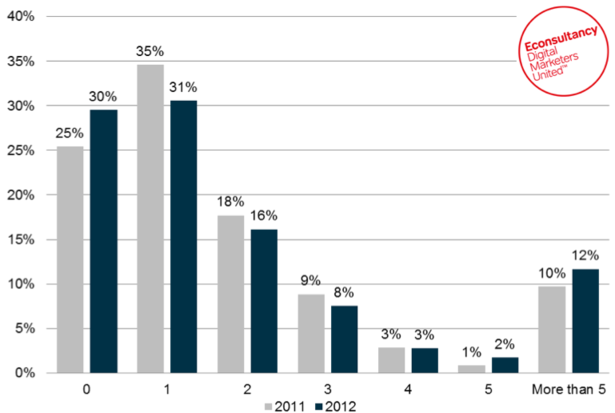
To back this up, a recent posting from eConsultancy highlighted an important and worrying trend..... website analysts are disappearing.

If you look at the graph above, you will see that in the recent survey, for a question asking "How many dedicated employees does your organisation have doing analysis of web data?" the number of organisations with zero staff responsible for web analytics has actually increased.

Increased? Surely it doesn't make sense that, in an increasingly digitally-savvy business environment, companies are downsizing their online analytics capability? It would seem so, and this is further backed up by the other data in this survey.... that clearly shows that most companies (i.e. those with up to 3 people responsible for online insight) have been reducing their focus on this important function in the last year. Perhaps unsurprisingly, only those large companies with five of more dedicated website analysts have increased their numbers.

It seems that the either role of website analyst is disappearing, or the smart staff required to fill these roles just aren't around any more. Where have all these people gone?